Quick Start
Get Chief running in under 5 minutes.
Prerequisites
Before you begin, make sure you have:
- Claude Code CLI installed and authenticated. Install Claude Code →
- A project you want to work on (or create a new one)
Verify Claude Code is working
Run claude --version in your terminal to confirm Claude Code is installed.
Step 1: Install Chief
Choose your preferred installation method:
brew install minicodemonkey/chief/chiefcurl -fsSL https://raw.githubusercontent.com/minicodemonkey/chief/main/install.sh | bashgit clone https://github.com/minicodemonkey/chief.git
cd chief
go build -o chief ./cmd/chief
mv chief /usr/local/bin/Verify the installation:
chief --versionStep 2: Create Your First PRD
Navigate to your project directory and create a new PRD:
cd your-project
chief new
This launches Claude Code with a preloaded prompt. Work with Claude to describe what you want to build—your project goals, user stories, and acceptance criteria. Claude will help structure your requirements and write the prd.md file.
When you're done, type /exit to leave Claude Code. Chief then parses prd.md and generates prd.json:
prd.md- Human-readable project requirements (written by Claude)prd.json- Machine-readable user stories for Chief to execute (generated by Chief)
Iterating on your PRD
Run chief edit to reopen Claude Code and refine your prd.md. Chief will regenerate prd.json when you /exit.
Step 3: Launch the TUI
Launch Chief's Terminal User Interface:
chiefThis opens the TUI dashboard in Ready state. The loop doesn't start automatically—you control when it begins.
Step 4: Start the Loop
Press s to start the Ralph Loop. Chief will begin working through your stories automatically.
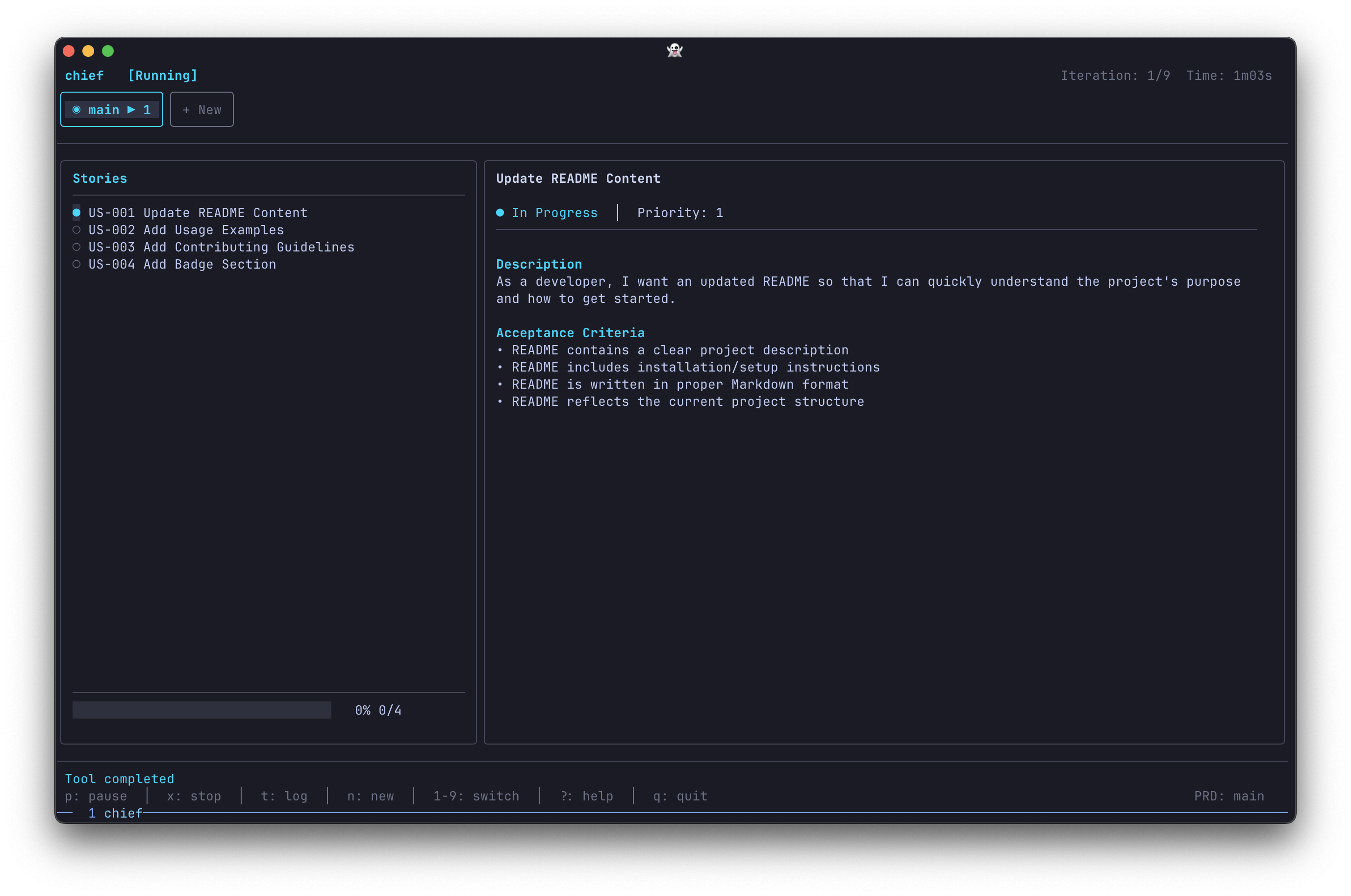
The TUI shows:
- Tab Bar - All your PRDs with status indicators
- Stories List - User stories with completion status
- Story Details - Current story's description and acceptance criteria
- Live Activity - Real-time status updates from Claude
Keyboard Controls
| Key | Action |
|---|---|
s | Start the loop (when Ready, Paused, or Stopped) |
p | Pause the loop (finishes current iteration) |
x | Stop the loop immediately |
t | Toggle between Dashboard and Log views |
n | Open PRD picker to switch or create PRDs |
1-9 | Quick switch to PRD tabs 1-9 |
j/↓ | Navigate down (stories or scroll log) |
k/↑ | Navigate up (stories or scroll log) |
? | Show help overlay |
q | Quit Chief |
Hands-off operation
Once started with s, Chief runs autonomously. You can watch the progress or walk away—it will complete your PRD and play a sound when done.
What's Next?
Now that you've run your first Chief loop, explore these resources:
- Installation Guide - Detailed installation options for all platforms
- How Chief Works - Understand the autonomous loop
- The Ralph Loop - Deep dive into the execution model
- PRD Format - Write effective PRDs
- CLI Reference - All available commands and options